Building AdSense Revenue: A Google AdSense Tutorial

building adsense revenue

by

This is a guest post from Forest Parks. Forest is a full time blogger and has been working online for over 4 years.  If you want to guest post, check out my guidelines here.

As a blogger when you first learn that it’s actually possible to earn money from your website the thoughts of making easy millions runs through your head. We all had this thought and sadly it’s unlikely it will happen just like that. Don’t let that put you off, with hard work, testing and concentrating on creating high quality sites obtaining a full-time income from your online endeavors is totally possible.

My name is Forest, I started off my online career as a freelance graphic designer and had a blogspot where I talked about whatever I felt like. Early on I found out about earning money from Adsense and implemented it as many places as I possibly could on my no-traffic blog. Suffice to say I earned nothing for a long time!

It didn’t put me off though and I was determined to find out what I was doing wrong and how I could improve myself. Over the years I went through many websites and these days my main website surrounds the topic of frugal living and lifestyle. I make the bulk of my online income from AdSense and over the years I have come across a lot of tips that have worked for me. In this article I wanted to answer a few questions you may have and bring up some important points.

So let’s get started with this AdSense tutorial.

When should I put AdSense on my site to build revenue?

This all depends but the reality is that you won’t make a whole lot of cash until you have a good amount of traffic unless your website happens to be in a niche that gets a huge payout per click, we’ll talk a little about that later.

I have a site called Regular Runner that at time of writing does not have any advertising on it because I want to build up a credible and trustworthy image, hopefully with some regular readers and a community. The number one thing about this website is to make it high quality and make sure I am enjoying the writing, running is a passion of mine. I’ll likely add a small AdSense block when the traffic regularly reaches 100 unique visits per day.

My logic here is that a 2-5% click-thru rate is roughly what I expect from my websites. At 2%-5% ctr (click thru rate) with 100 visits a day that is just 2-5 clicks per day.

Also if you are yet to apply to AdSense, keep in mind Google likes to see a functioning and genuine site. Google doesn’t want publishers who are just in it for the AdSense clicks and you need to concentrate on quality content and not gaming anything. Put AdSense and earnings in the back of your mind when first building a site.

How much should I expect to earn per click?

AdSense clicks vary greatly. I can’t disclose how much I get paid per click but I would say it ranges from almost nothing to a couple of dollars with the majority sitting closer to the almost nothing side of the scale.

Various niches pay-out very differently and nothing is guaranteed, but to get an idea of what your niche may payout you can visit Spyfu.com, type in a keyword and it will tell you how much advertisers are paying Google Adwords to advertise on that keyword.

If you type “Home Improvement” into SpyFu you’ll see that it gives a range of $1.63-$2.01. Sadly that isn’t what you will get paid per click. In my experience a realistic estimate is 1/4 of what the advertisers pay. So say roughly  $0.45 per click, although remember this can’t be set in any stone, it is just an idea.
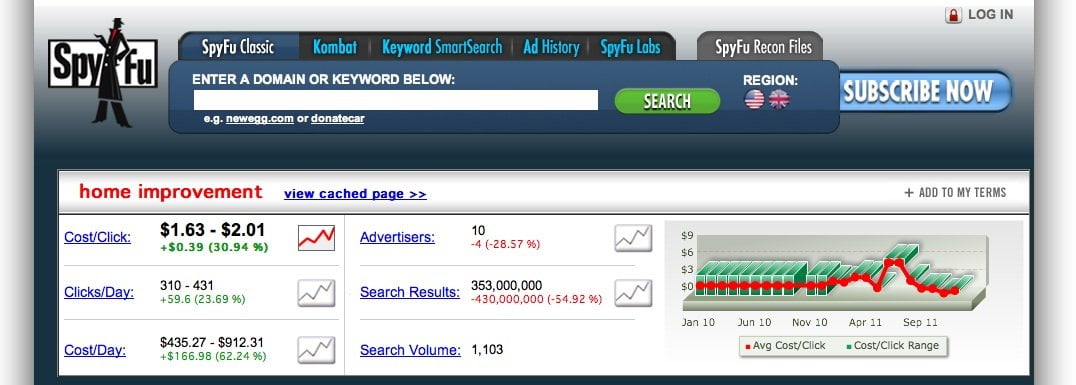
adsense revenue research screen

Where should I put my ads, what color should they be, and how many should I put up?

This is a question up for a lot of debate so i’ll give you my take on it. Every site is different, some work well with one ad in the sidebar, some with an ad under the post title and after the content. Some do well with a few text based ads and some better with a mixture of everything.

I generally start off a site with the same layout. That is one ad, at the top of the post aligned left. I normally size this ad 336×250 or 300×250 as you can see below in the screen shot from my post about the cheapest places to live.
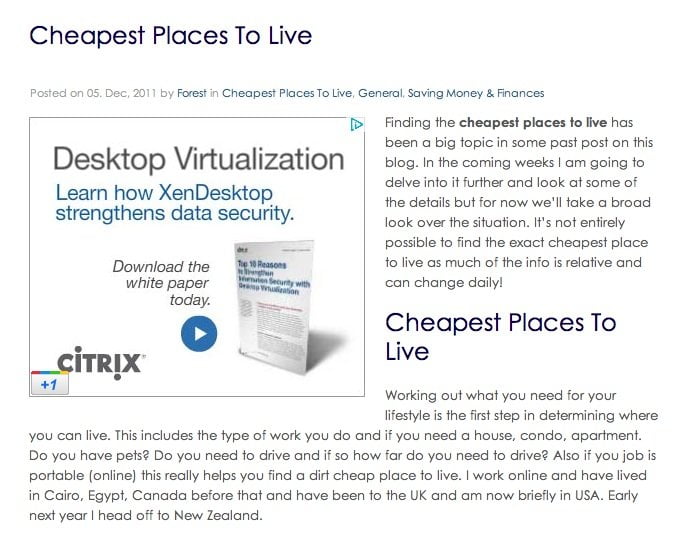
adsense tutorial screen

Google wants to see the content of your site up high so this is how I always start with a layout. It has high visibility but is obviously an ad. The color is up to you and needs to be tested. I always start and often stick to default color and select a text / image ad mix. Testing can involve matching the colors of the ads to the site, testing just text ads and moving the position to the right hand side of the text or after a few paragraphs. Usually I come back to this layout after initial testing but not always!

I suggest you start with one ad because there are only so many quality ads that will display and you don’t want to clog your content. Some of my sites have multiple ads but this comes later down the line with testing and depending on other factors such as if the blog is multi-author and how high your traffic is.

I can’t code to save my life, are there plugins that can help?

If you are running your blog on Google’s own Blogger platform then Google has conveniently built AdSense widgets into the site builder. If you are self hosted on WordPress, like I am, then you may need the help of a plugin. There are a lot of plugins out there but one simple plugin still delivers the simplicity I need for most of my sites. Sadly it has been out of development for quite some time but it still seems to work great. Maybe one day it will get picked back up and developed further.

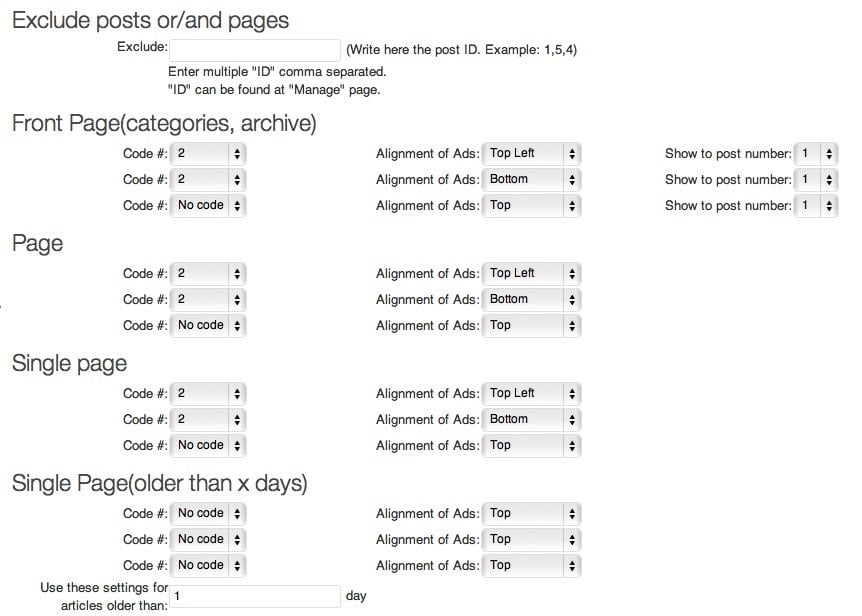
The plugin is called Why Do Work AdSense Plugin and it allows you to easily insert AdSense code (or any html / javascript) in up to 3 places per post or page. It even allows you to add AdSense to a post after it has been live for x amount of days and through a simple system you can enter post IDs to exclude AdSense from certain post. It doesn’t come simpler for an AdSense plugin.

adsense plugin screen

Other tips for building AdSense Revenue…

  • Sensible testing of all elements positioning, size, coloring and anything else is key once you get to grip with things.
  • Never, ever click on your own ads.
  • Sign up to AdSense.blogspot.com and read it regularly. They have great advice and tips. It is also worth searching through the archives.
  • Read the AdSense T&C’s and understand them as best as you can.
  • Keep the emphasis on building a quality site, that is what Google wants and what you should want too.


Editor’s Note: The book below is a great read for those looking to significantly reduce your AdWords cost and increase your CTR.

Your input?

If you are reading this and have experience building AdSense revenue then please share your thoughts and findings. If you are new to the whole thing then don’t hesitate to ask any questions or share any thoughts or ideas.

Thanks to Geoff for letting me write this guest post.

GD Star Rating
loading...
Building AdSense Revenue: A Google AdSense Tutorial, 4.7 out of 5 based on 14 ratings
Related Posts Plugin for WordPress, Blogger...

27 comments on Building AdSense Revenue: A Google AdSense Tutorial

ddiy January 6, 2012 at 3:16 pm

Hey Forest- Thanks for the fantastic guest post! I have a few follow-up questions for you:

1- Do you know if the 2-5% CTR you experience mostly results from search engine traffic? If so, any idea what sort of CTR you normally see from regular readers or social network traffic?

2- Have you noticed better conversion using text only ads, images, or text + image? I’m guessing it’s the latter since that’s what you use. Do you notice if any of these options work better than others in specific niches/verticals?

3- I see you suggest the large adsense block at the top left start of a post. I usually have a post image that appears at the beginning of a post. For blogs like mine with images, would you suggest having the ad block appear above or next to the image? My hesitation with both of these scenarios is that text content is pushed down below the fold. And as you mention, I’ve heard Google does not really like those sites that have little content above the fold. Another problem (for me at least) is that the default Thesis post image is set to appear directly before or after your title and it can’t easily be shifted below an ad without some tinkering.

4- Related to my last question, have you ever tried a 234 X 60 half banner at the top of your posts instead of 300 X250 rectangle so as not to push content down as far? If you have, is there a noticeably worse CTR? And do you think something like this would convert better above or below the post title?

5- For those considering multiple ad blocks on a given post, do you think there is some risk of lower payouts per click because you will naturally have lower CTR’s because of more ad impressions on every post?

Thanks again for posting, very informative piece!

Reply

Forest Parks January 6, 2012 at 4:42 pm

Hey Ddiy, thanks for hosting this guest post. I’ll try and answer your questions.

1. Almost 100% from search engines. Most direct traffic will not click on your ads but that is a good thing because it means they are reading your content. Social media storms almost always produce low adsense payouts.

2. I usually start with a mix and then do a test period of the other options. Generally I come back to the mix. You get more ads with text but images seem to have a higher payout per click.

3. I would find out how to mod thesis (probably just a css change or a small code change) and move the image down a little for best ctr. Or remove the thesis image and start manually placing them in posts. I used to let content go below the fold but as you mentioned that is a no-no now.

4. Generally I have gotten a lower ctr but you have to do a measured test on your particular site. Also it may be better for your readers to have a smaller ad. With WhyDoWork you could set a smaller ad for say first 7 days and then have it switch to a bigger ad after that. I don’t know if the plugin will play nicely with thesis as I know it is coded a little different.

5. Google advise multiple ads and I have heard that they show the best ads first so in theory it shouldn’t cause an issue. On some of my sites I use 3 ad blocks. However if you want readers to appreciate your site and stick around less ads are better and the ad blocks everywhere could deter them.

Reply

Jeremy Cook January 6, 2012 at 9:02 pm

Great article! A 2 – 5% CTR, that’s pretty good! I don’t get nearly that much, but I guess if all of it comes from search, that represents maybe a fourth of my traffic if that!

If you want to check out my site (jcopro.net), I’d love to hear your feedback on my ad placement, etc. Also, I’ve been thinking about trying to take on some ads that pay a set monthly rate – Any thoughts on the best way to do this?

Reply

Forest Parks January 6, 2012 at 9:44 pm

Hey Jeremy, ok here is where I would start. Take off all adsense ads, then put one 300×250 left aligned at the top of each post, see how that does for a week or so. Let me know if you need any help.

If you can get some monthly sponsors and ads then why on earth not! Diversity is key.

Reply

Jeremy Cook January 7, 2012 at 12:19 pm

Thanks for the suggestion, but I wonder if that would really annoy visitors. I often feature a large image on the top of the page like this:

http://www.jcopro.net/2012/01/02/this-was-the-image-of-the-day-on-wikimedia-it-needed-some-changes/

Thoughts?

Also, I currently just insert the Adwords code in each post, so changing it over would require some serious work! Maybe I’ll have to try out the “Why do Work” plugin – could make things a lot easier to try.

So all that being said, on a slightly different thought, my site got 19k pageviews last month. How much AdSense revenue should this be pulling in?

Reply

Forest Parks January 8, 2012 at 11:03 am

19k should be enough to bring in a reasonable amount to say but it’s impossible to say exact figures (every site is different).

I would say try moving the 468 banner below the post to above the image and test to see what ctr is like. It shouldn’t be too annoying.

Reply

Mike Collins January 7, 2012 at 8:22 am

Great summary of how to implement AdSense Forest!

1. I use Thesis and that’s a good suggestion about manually inserting the images instead of letting it default to the top. I think I’ll start trying that more.

2. Do you have any other tips or tools for testing? Maybe a plugin for split testing?

3. I read somewhere on the AdSense help site that the payout for publishers is actually like 68%. But I think SpyFU numbers are based on what advertisers pay to appear in Google’s search results. Bids for the content network can be much lower.

Reply

Forest Parks January 7, 2012 at 10:53 am

The easiest way to split test is to just do one setting for a week, then do another setting for a week and then compare results. You can do it on the fly, called a/b testing, and Google offer a way of doing that with http://www.google.com/websiteoptimizer…. Although it’s not the easiest thing to set up.

Oh, that is really interesting about the payout, could well be I have had it wrong all these years! If you see that link again I would love to read it.

Reply

Mike Collins January 10, 2012 at 7:12 pm
Forest Parks January 10, 2012 at 9:35 pm

Thanks Mike.

Reply

Chris January 7, 2012 at 11:07 am

We are running a few ads but we only average about 1.00-1.40 per day. We get roughly 100 visits per day. We wanna know if we have too many ads or what suggestions you might have had for more clicks. We started about 3 months or so ago so we have been budgeting about 150 per month to spend thru Facebook ads and google Adwords. Thanks in advance

Reply

Forest Parks January 7, 2012 at 1:32 pm

Hey Chris, it really depends on your niche. Is it for the humor site (I didn’t see adsense when I looked quickly).

I would try the one ad in the content, left aligned by itself for a while. If you don’t see any improvement it could be that the niche just doesn’t earn much per click and you may want to take adsense off for a few months until traffic increases. You may have more luck with Amazon links to DVDs and things if it is the humor site.

Reply

Forest Parks January 7, 2012 at 1:33 pm

Oh Chris, If the posts are all with videos up top then maybe try a 468×60 above each video….

Reply

LaTisha @YoungAdultFinances January 8, 2012 at 12:52 am

Thanks for sharing the tips! You have done a really great job with Adsense and getting it to perform well. I also think that I need more traffic to justify an ad block but I am getting my header ready for it.

Reply

Forest Parks January 8, 2012 at 11:04 am

Hey LaTisha, if your traffic is still low I would take it off completely and concentrate on building the blog and community. When it comes to time to add the ads then it’s easy to explain why you are doing it to the regulars and I am sure they would understand.

Reply

Jai Catalano January 15, 2012 at 4:05 am

Very good guest post. I always put my ads on the right. Maybe I should switch and do a test? :)

Reply

ddiy January 16, 2012 at 12:58 pm

Hi Jai, Split testing is a great idea….try something different on a few pages and see if you see better results.

Reply

John | Married (with Debt) January 18, 2012 at 10:40 am

Great post, Forest. I have my ads color matched, but since I’m pretty new, consider my expectations extremely tempered. Thanks for including the visuals.

Reply

Forest Parks January 18, 2012 at 12:52 pm

Thanks John, you may want to split test the ads between matched or adsense standard blue and see what convert better. Sometimes it is better for the ads to stick put as ads.

Reply

Mukesh agarwal February 2, 2012 at 4:39 pm

I started my blog with mere $30 a month and within 2.5 years I make more than thousands from my blog. Here are my tips:

Content is not king. It should be the PRO of your website. Ads should not be so bad that they make it difficult to read your stuff.

Get decent backlinks from others in your niche.

Keep writing frequently. The frequently you write the faster you get indexed.

Move to affiliate marketing than ads.

Never promote anything more than what it is worth.

Reply

Forest February 22, 2012 at 3:50 pm

Thanks Mukesh, nice tips.

Reply

Suresh Khanal March 17, 2012 at 9:41 pm

That’s a nice tutorial and Adsense articles are always more interesting to me. No matter how long you play with it, there is always something to learn to optimize.

I am using Ad Inject plugin to insert codes in my wordpress blog. That plugin too is very nice and offers lot of options to optimize.

Reply

Forest March 19, 2012 at 10:51 pm

Thanks Suresh. Yeah the key is to keep testing.

Reply

xag157 July 25, 2012 at 11:43 am

i am having a blog with nearly 600 t0 700 clicks per day but if i apply for adsense my account account was disapproved.can you say what will be the reason and what should i do?

Reply

ddiy July 25, 2012 at 12:39 pm

XAG, Google probably rejected your site do to the nature (racey photos of women). You may find something in their Terms of Service that may shed more light. There are other ad networks that are a little more open to that sort of thing (like Adbrite and Chikita) if you want to try out alternatives.

Reply

Yasir Faraz January 30, 2013 at 5:39 am

Hi Forest,
First of all thanks for this valuble information.
I have few concern regarding my website…
1.)I have started a new website i want to ask how much time i should wait to register for google adsense ,i have a traffic of around 100 user per day .
2.can u plase guide me further on this
Yasir
Yasir

Reply

Forest Parks February 24, 2013 at 6:00 pm

Hey Yasir, if your site is established now and has a good chunk of content then I would say it’s a good time to apply.

Reply

Leave a Comment